Most people don't fail at thesis writing because they can't write. They fail because they treat a systems problem like a document problem.
The first day I wrote my thesis, I didn't write a single word of content.
I wrote a file.
320 lines.
Called CLAUDE.md.
It was the constitution for my entire thesis system.
An MBA thesis looks like a document.
It's not. It's a system.
7 chapters. 61 references. A dozen figures and tables. Three-scenario economic models. A 1,262-line auto-assembly script. 7 rounds of advisor feedback, every single one tracked to closure.
Without a system, it inevitably devolves into a file named
thesis-v3-revised-final-FINAL-actually-final-this-time.docx
We've all been there.
So I didn't start by writing the thesis.
I started by writing rules.
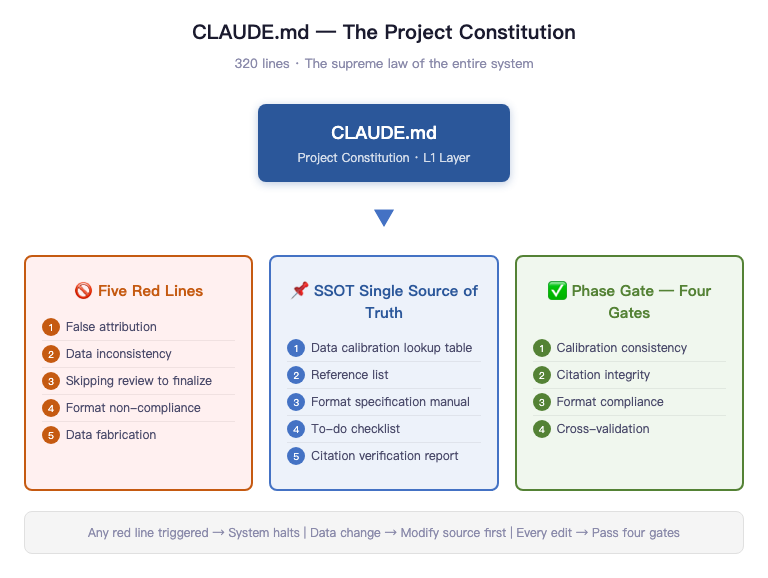
That 320-line CLAUDE.md boiled down to a few things:
Five red lines.
False attribution. Inconsistent data calibration. Skipping review to ship directly. Format non-compliance. Data fabrication.
Any one of these triggers an immediate halt.
Then came SSOT (Single Source of Truth).
Every critical data point lives in exactly one place. Changes start at the source and propagate outward. Never the reverse.
Then came Phase Gate.
Every chapter revision must pass through four gates: data calibration consistency, citation integrity, format compliance, full-text cross-check. No gate cleared, no moving forward.
Most people start day one by writing the introduction.
I started day one by writing rules.
Because what actually derails a thesis is never the writing.
It's the lack of a system.
Honestly, none of this was designed upfront. Pretty much every component got bolted on after something broke.
What you think a thesis is determines what you do on day one.
Think of it as a document, and you'll open Word.
Think of it as a system delivery, and you'll write a constitution first.
Same thesis. Two completely different starting points.
Before You Start — The Counter-Intuitive Prep Work That Saves Your Life
The first thing you do when writing a thesis isn't opening Word. It isn't outlining. It's reading every single document the school gave you.
The required materials for a Peking University Guanghua MBA thesis (one of China's top business schools, think Wharton or INSEAD tier) come as six attachments, bilingual Chinese-English, totaling 12 PDFs and Word documents. They include the thesis template, defense schedule, originality declaration, and submission pledge. Most people skim through them -- "got it, got it" -- then start writing. I read every single one. Including the English versions. Even the table of contents.
After reading everything, I did something most people would call extreme.
I distilled the formatting requirements from these documents into a 118-item format audit checklist. Written out line by line, each one checkable. A4 paper, top margin 3.0cm, bottom 2.5cm, left and right 2.6cm, SimSun plus Times New Roman size 12, 20pt line spacing, chapter titles in SimHei size 16 centered, section headings in SimHei size 14 left-aligned, figure captions below the figure centered in SimSun 11pt, table captions above the table centered in SimSun 11pt, odd-page headers showing chapter title, even-page headers showing "Peking University Master's Thesis"... Dense as hell when you write it all out, but every single item is a potential rejection trigger.
118 items. Not because I have OCD. Because formatting isn't about what looks right to you. The only standard is: pixel-perfect alignment with the school template. You can write brilliantly, but if the formatting costs you points, the committee's first impression is that you're sloppy.
Having standards alone wasn't enough. I also needed to know "what a real thesis actually looks like."
That's where past theses came in. I found final submissions from graduated classmates and compared them line by line against the template: what the template didn't spell out but the final version required; what previous students added on their own that wasn't a hard requirement. More critically, I also found a defense transcript that revealed how the committee actually asks questions.
Referencing isn't plagiarism. It's skipping avoidable pitfalls.
Before I wrote a single word, I calibrated what the finish line actually looks like.
Then came the truly counter-intuitive part.
12 figures, produced through two pipelines: data charts via Python's matplotlib, conceptual diagrams via HTML/SVG templates with Playwright screenshots. Why bother? Because figures always need revisions. When the advisor says "change the x-axis labels on this chart" or "swap out this color scheme," if your figure was hand-drawn in Photoshop, revising it is soul-crushing agony. But if the figure is code-generated, you change one parameter, re-run, and the new figure appears in thirty seconds. Case volume trends, competitive landscape scatter plots, user behavior funnels -- data charts go through matplotlib. Business Model Canvas, product architecture, three-tier revenue structure, user journey mapping -- conceptual diagrams go through HTML rendering then screenshots. Two pipelines, but sharing one hardcoded visual spec: a five-level blue-gray academic color palette from #2B579A to #D0E2F0, one accent orange, one success green, Chinese in SimSun and English in Times New Roman -- even the color scheme isn't left to human eyeballing, it's defined as constants. Every figure is code. Every figure can be regenerated with one command.
15 tables (including appendices), all written as Markdown three-line table format. The assembly script automatically converts them into proper three-line tables in Word. Every table has a title above, footnotes below, consistent formatting — not manually adjusted, guaranteed by script.
The most "insane" part is the 1,262-line JavaScript assembly script. It does one thing: merge 10 Markdown chapter files into a single Word document that meets the school's formatting requirements. Auto-generated table of contents, three-line tables, headers and footers, footnotes, correct pagination. One command, ten seconds, a 0.97MB Word file appears.
You might think all this sounds cool but unnecessarily elaborate. And honestly, every single step goes against human nature. Nobody sits down to write a thesis thinking "I should write a JS build script first." But every step saves ten times the rework.
I broke down on my fourth round of formatting fixes, then wrote this script. After that, formatting problems were never formatting problems again -- they became parameter problems. Change the parameter, re-run, done.
Prep work isn't about preparing "things you might need." It's about building "things you will definitely need, before you need them."
Why the Traditional Approach Is Guaranteed to Crash
The traditional approach crashes for one reason: you're using a single-threaded human brain to handle a task that requires a database.
Let me tell you a real story.
My thesis has one critical number: the national labor arbitration case volume. This number appears six times in the body text. Six references, three different calibrations. Some say "over 3.85 million cases," some say "3.5 million cases," some say "nearly 4 million cases." One instance even used this number to support a key argument, but its calibration was completely inconsistent with the others.
It took me nearly an hour to trace the source: China's Ministry of Human Resources and Social Security 2024 Annual Statistical Bulletin, original text stating 3.850 million cases.
One hour. To confirm one number. And this number appears six times in the thesis -- without systematic checking, you'd never realize three different versions coexist. You'd only remember "I wrote this number, it's roughly right."
Managing data with memory is like using your brain as Excel.
The brain decays, distorts, and delivers the most wrong answers with the most confidence.
This problem is just the tip of the iceberg.
The traditional thesis workflow is nearly universal: open Word, start writing, save one file, then revise, then revise again, then the file is called thesis-v3-revised-final-FINAL-actually-final-this-time.docx. I've seen the actual filenames classmates sent me. Not even slightly exaggerated.
The consequence of cramming 50,000 words into a single file? You're editing a paragraph in chapter five with no idea whether chapter three says something similar. You run find-and-replace on a term with no idea whether the other three instances still make logical sense after the swap. By version 3, you've forgotten which judgments in version 1 were carefully reasoned and which were thrown in on the fly.
Even worse: a 50,000-word Word file has zero discernible structure. Every problem is buried inside it, invisible until it detonates.
Advisor feedback is the third trap.
What did the advisor actually say? Three WeChat voice messages (China's equivalent of iMessage), one minute each. You jotted down the gist, made two changes. Next meeting, the advisor says "that's not what I meant." You revise again. This loop repeats indefinitely.
Feedback without closure is like support tickets without status tracking. You know there are issues, but not whether they've been fixed. You know you made changes, but not whether the changes are correct. The advisor knows there are problems, but not what you changed. Every conversation rebuilds context from scratch.
This isn't a competence problem. It's an architecture problem. You're using a single-threaded human brain to handle a systems-level task that requires a database, version control, and quality gates.
Three fatal flaws of the traditional approach: data relies on memory (will drift), content lives in a single file (can't be edited safely), feedback relies on conversation (no closure). These problems don't exist independently -- they compound. And they detonate collectively when your thesis is 60-70% done. Every small issue you've been accumulating suddenly becomes a big one.
Systemic problems require systemic solutions. Tools solve the "writing" problem. Systems solve the "not crashing" problem.
Literature Review — The Biggest Trap in Any Thesis, and How We Didn't Fall In
The literature review is the most accident-prone section of any thesis.
Not because finding papers is hard, but because literature management is a massively underestimated engineering problem. Most people manage references the way they manage bookmarks -- a vague impression, knowing they "saved it somewhere," filling in the name and year when citing. This approach will blow up at the defense table.
It blows up in four ways.
You cited a paper but never carefully read the original. The committee casually asks "you cited Teece 2010, what's the core contribution of that paper?" You give a rough answer. They follow up: "what does the original text actually say?" You can't answer. Awkward silence. Citation formats are inconsistent -- some write "Teece, D.J." and others write "TEECE D J." Format review bounces it back. The reference list doesn't match the body text: the text cites an author but the list has no corresponding entry -- that's a ghost citation. Or the list has an entry the text never cited -- that's a zombie citation. GATE-2 and AUDIT-5 specifically catch these two types. Finally, 61 references, Chinese first then English, each sorted alphabetically by author name. The experience of manually sorting this can be described in one word: torture.
A literature review isn't "read a few papers and write a summary." It's a data integrity problem. And data integrity problems are solved with engineering methods.
So I built a literature download ledger.
This ledger is now at v13, covering all 61 entries. Each record includes reference ID, download status, filename, file size, storage location. Everything that can be grounded is grounded: 43 academic papers and reports have local PDFs, 15 books are separately tagged with purchase status, 3 regulatory documents retain official originals.
Among Chinese references, academic papers and industry reports are managed separately. English academic papers cover every journal article in the reference list. Web-based references are uniformly printed to PDF for archiving. The McKinsey generative AI economic potential report — downloaded. The Stanford Legal Design Lab report — downloaded. The NBER working paper — downloaded. The arXiv preprint — downloaded too.
The system really proved itself when the advisor's feedback added 7 new references. She mentioned needing supplementary papers on business model innovation, legal tech, and LLM economics. All 7 were downloaded and entered into the ledger the same day. That speed isn't because I'm particularly diligent -- it's because the ledger structure was already there. Adding one entry just means filling in the template.
Literature management isn't "I think I saved it in Zotero somewhere." It's full coverage of 61 references — 43 academic papers and reports with local PDFs, 15 books with purchase status tagged, 3 regulatory documents with originals archived. Every single one has an audit trail.
But having PDFs isn't enough. Having a PDF doesn't mean what's inside actually says what you cited it for.
That's where the citation verification checklist comes in.
61 references, each verified on four dimensions: whether the author and year match the PDF original, whether the key figures and conclusions cited in the thesis match the PDF original, whether theoretical attribution is correct (i.e., "X proposed Y" — did X actually propose Y?), and whether volume/issue/page numbers match the PDF cover.
43 references have been verified so far (36 original plus 7 new), with several issues caught and corrected. Some real examples. China's Ministry of Human Resources and Social Security 2024 statistical bulletin -- the thesis originally said "3.5 million cases," but the PDF says "3.850 million cases." Corrected. The McKinsey 2023 report -- originally wrote "inference costs dropped 80%," but the PDF actually says "inference costs continue to decline significantly." Overstated. Softened. Anderson 2009's Freemium concept -- cited "approximately 5% conversion rate," but in the PDF this is an industry rule of thumb, not empirical data. Footnoted accordingly. Korinek and Vipra 2024 -- originally wrote that AI inference costs show "super-linear growth," but the PDF contains no such statement. Pure over-interpretation. Deleted.
Book references like Yin 2018 on case study design and Porter 1985 on competitive advantage are tagged "purchased but not page-verified" -- a reasonable trade-off. Page-by-page verification cost is too high, but these classic works' attributions are academic consensus. The risk is manageable.
What's this checklist actually worth? At the defense, when the committee flips to any citation, you pull up the corresponding page in the PDF within three seconds. You're not in "I think it was roughly like this" mode -- you're in "page three, second paragraph, here's what it says" mode. Those two states project completely different energy at the defense table.
Last: automating reference sorting.
China's GB/T 7714 citation standard requires references listed Chinese first, then English, each sorted alphabetically by author name. With 61 references mixed together, getting the order right manually without a single error is humanly impossible.
So I wrote a sorting verification script that runs through the reference list to confirm the Chinese section is correctly ordered by pinyin and the English section by surname. AUDIT-4 handles exactly this.
Orphan checking (AUDIT-5) is also script-driven: every citation in the body follows (Author, Year) or Author (Year) format. The script scans the full text, extracts all citations, and cross-references them bidirectionally against the reference list. Body has it but list doesn't -- ghost citation. List has it but body never cited it -- zombie citation. Finding these by eyeballing 50,000 words would take a day. Run the script, three minutes, every discrepancy listed. Fix them one by one.
References deserve this level of seriousness. The reference list isn't an appendix -- it's your academic credibility. 61 references, each one a claim that you've read, understood, and correctly cited the work. One ghost citation or one wrong attribution can obliterate your credibility at the defense table. Engineering your references isn't overcomplicating things. It's the minimum rigor this work deserves.
Single Source of Truth — How SSOT Cures Data Chaos
The most maddening part of thesis writing isn't the writing. It's finishing a revision to chapter five and discovering the number in chapter three no longer matches. You go back to fix chapter three, then find chapter seven's conclusion still references the pre-revision version of chapter five. You don't know which one is right. You start doubting your own memory.
This isn't carelessness. It's an architecture problem.
Put simply: if every chapter keeps its own copy of a number, this project will eventually blow up. SSOT means something simple: there can only be one place in the system that is correct.
My solution is a table. A table with only 12 entries, called the Data Calibration Quick Reference.
Every critical number that appears more than once in the thesis has exactly one authoritative source. 3.85 million cases/year -- from China's Ministry of Human Resources and Social Security 2024 Statistical Bulletin, original text: "labor arbitration cases accepted: 3.850 million," word for word. Approximately 75% without legal representation -- derived from conservative reverse-calculation using publicly available representation rates from multiple regional labor arbitration commissions. Note the word "approximately" -- it's not casually thrown in, it's mandatory, because this isn't a nationally standardized official statistic. Gross margin 96%-97% -- from the calculation model in Appendix A, the actual figure after deducting LLM costs and payment processing fees.
These 12 entries cover virtually every number in the thesis that could be questioned for its source.
The modification rule is exactly one: change the source first, then change downstream. Want to change 3.85 million to 3.86 million? Update the quick reference table first, then grep the entire text to find every instance, and sync each one. The reverse is prohibited -- you cannot change the number in a chapter first, then "update" the quick reference table. Because once you go in reverse, the table loses its authority. It's no longer a source of truth. It's just a lagging memo.
The word "approximately" deserves its own mention. This single word is the easiest thing to delete in the entire SSOT system -- and the one thing that must never be deleted. There's no nationally standardized official figure on arbitration representation rates. If you write a conservative reverse-calculation result as a precise number, you're digging your own grave. The moment a committee member asks about regional variations or methodology, you're cooked. "Approximately 75%" preserves the methodological boundary. It's not laziness. It's data honesty.
But SSOT isn't just that one quick reference table.
SSOT is fundamentally a way of thinking: for every type of information, only one place in the system can be authoritative. Everything else is a reference, and references must stay consistent with the authority.
In this thesis system, the reference list is an SSOT. 61 references — each entry's format, author, year, and journal information is authoritative only in the file 08-References.md. When you see (Teece, 2010) in the body text, you look up the corresponding entry in the reference list, not in your memory.
The formatting spec is an SSOT. SimSun size 12, 20pt line spacing, top margin 3.0cm, figure captions centered below — these aren't memorized, they live in 00-Typesetting-Manual.md. When you encounter any formatting question during Word layout, go back to this file. Don't trust your instinct.
The to-do list is an SSOT. Which issue is fixed, which is still open, which piece of advisor feedback has been handled — all in 00-Todo-List.md. Not in your head. Your head will lie to you.
The citation verification report is an SSOT. The 43 references already verified against PDFs, the various expression errors found and corrected — all documented. You don't need to remember "I verified that reference last week." You just open the report and check the status.
The Word assembly script path is an SSOT. 04-thesis-chapters/scripts/assemble-docx.mjs — this is the only assembly script. There is no v2, no v2-backup, no v3-actually-final-this-time.
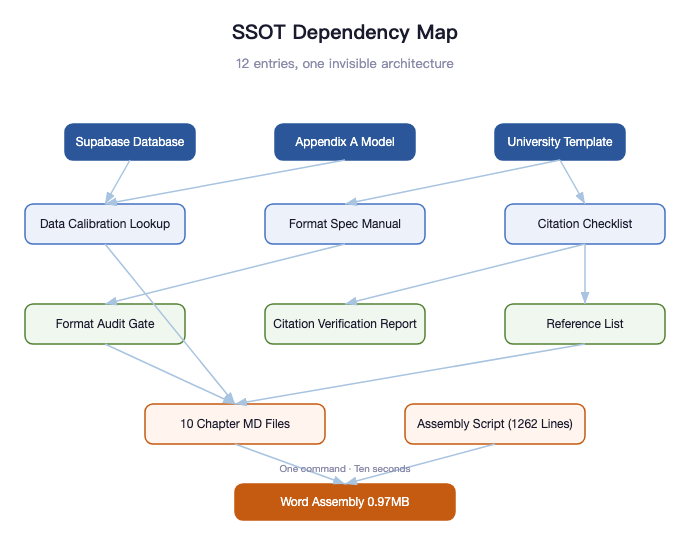
Beneath these 12 SSOT entries, there's an invisible dependency graph.
The Data Calibration Quick Reference depends on the Supabase database and Appendix A calculation model. The Format Audit Gate depends on the Typesetting Manual. The Citation Verification Report depends on the Citation Verification Checklist. The To-Do List is the aggregate view of all other files. The assembly script depends on all 10 chapter files.
Draw out these dependencies and you don't get a memo -- you get an architecture diagram. Structurally identical to the architecture of a software system: modules, dependencies, data flow, single source of truth. A thesis is a knowledge system, and knowledge systems face the same engineering problems as software systems.
You don't need to memorize every number. You just need to know where they live.
Knowing where a number lives is more valuable than memorizing the number itself. Because memory decays. Systems don't. When you come back three months later to revise your thesis, the quick reference table is still there, precise to the decimal point, complete with source files. You don't need to re-verify. You just open the file.
That's the essence of SSOT: it doesn't make you smarter. It makes it so you don't need to be.
Phase Gate — CI/CD for Your Thesis
Software engineering has a mature concept called CI/CD (Continuous Integration / Continuous Delivery). Every time you push code, automated tests run. Tests don't pass, code doesn't merge. No "I think it's fine, just ship it." Quality gates live at the system level, not the personal discipline level.
Theses don't come with built-in CI/CD. You have to build your own.
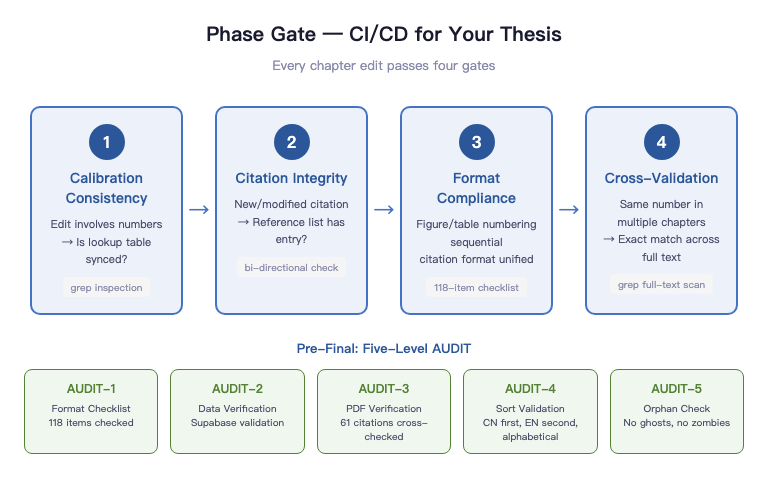
I built four gates. Called them Phase Gate.
GATE-1 is data calibration consistency. Whenever a revision touches numbers, check whether the quick reference table is in sync. Not "I updated it on the fly while editing" -- "I actively verified after editing." Those two things look similar. The first relies on memory. The second relies on process.
GATE-2 is citation integrity. Every time you add or modify a citation, check whether 08-References.md has a corresponding entry. Body has a citation but the list doesn't -- ghost citation. List has an entry the body never cited -- zombie citation. Both are hard failures. Both will surface at the defense.
GATE-3 is format compliance. Are figure and table numbers sequential? Are citation formats consistent? Are footnotes complete? These aren't aesthetic issues -- they're compliance issues. The template requires figure captions below the figure. You put them above. That's a formatting error.
GATE-4 is cross-validation. If the same number appears across multiple chapters, grep the full text to confirm exact consistency. Not approximately consistent -- literally identical, character for character -- including units, precision, and that word "approximately."
Four gates, run once per chapter revision. Sounds tedious, but each pass takes five minutes tops. Those five minutes save the hours you'd spend discovering "chapter three and chapter six don't match" the night before submission.
Speaking of grep cross-checks, this is the lowest-cost, highest-yield operation in the entire Phase Gate system.
One command: grep -rn "3.85 million\|2.9 million\|75%" 04-thesis-chapters/
This single command shows you every location across all chapter files that references 3.85 million, 2.9 million, or 75% -- precise to filename and line number. No need to open each file and read paragraph by paragraph. One second, full picture.
Wrong calibration anywhere? Missed update somewhere? grep will tell you. It doesn't miss.
Humans miss. At 2 AM, you've read the same paragraph ten times. Your brain starts auto-completing -- it sees "3.85" and assumes it's correct, because it expects it to be correct. grep doesn't assume anything. It mechanically matches character strings. No expectations. No fatigue.
Humans make mistakes at 2 AM. Systems don't.
Similar cross-check commands exist for gross margins, LLM cost calibration, and attorney fee ranges. After each relevant edit, run them once. Thirty seconds to confirm full-text consistency. This isn't OCD. It's using tools for what the human brain is bad at.
Before final submission, there's a five-level terminal audit, heavier than the routine Phase Gate.
AUDIT-1 is format alignment -- checking against the 118-item format checklist, item by item. That number isn't arbitrary -- it's what you get when you decompose every formatting requirement from the school template and past theses. Each item has a source. Each item is checkable. After checking them all off, you know you've passed. Not "I think the formatting is probably fine."
AUDIT-2 is Supabase live data reconciliation. The operational data cited in chapter six — 216 sessions, 881 events, behavioral funnel conversion rates — all have direct database query sources. Cross-referencing confirms the numbers in the thesis and the numbers in the database come from the same dataset.
AUDIT-3 is the 61-reference PDF citation verification. 61 references, each verified on four dimensions: author/year match, key data match, theoretical attribution correct, volume/issue/page correct. 43 verified so far, with several expression-to-original discrepancies found and fixed. At the defense, the committee can randomly flip to any citation, and I can find the corresponding page in the PDF original within three seconds.
AUDIT-4 is sorting verification. GB/T 7714 requires Chinese references first, then English, each alphabetically by author. Sorting 61 entries manually is hell. A verification script confirms it in five seconds.
AUDIT-5 is orphan checking: no ghost citations, no zombie citations. Every (Author, Year) in the body text has a corresponding entry in the reference list, and conversely every entry in the list is cited at least once in the body text.
Five audit levels, each with clear pass/fail criteria and output records. Not "roughly passed" -- "AUDIT-3 has verified 43 entries, 18 remaining, pending entries listed in section 3 of the citation verification checklist."
Phase Gate isn't bureaucracy. It's the insurance policy that keeps you from editing the wrong thing at 2 AM.
You're editing a detail late at night. The moment you finish, you're certain it's right. But you forgot chapter three has the same statement. You forgot that number also appears in the abstract. You forgot figure 5.2's annotation references that parameter. Phase Gate doesn't need you to remember any of this. It catches what you miss when you're too tired to notice.
The Flip Side of the System: Three Times I Almost Crashed
People ask me if this system was designed from the start.
No.
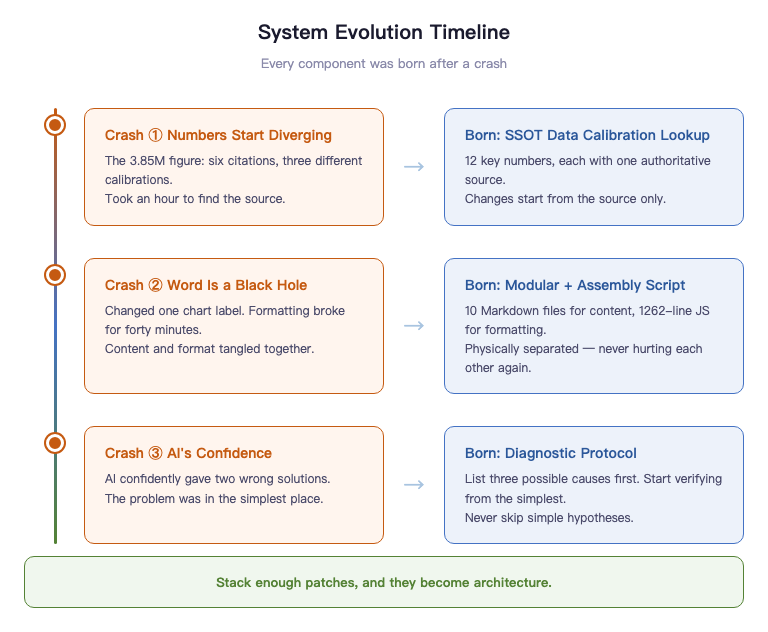
Almost every component was born from a crash.
Crash #1: The Numbers Start Splitting
I mentioned the 3.85 million story earlier. Six references, three calibrations, one hour to trace the source.
That's when it hit me: I was using my brain as Excel.
The SSOT Data Calibration Quick Reference was born that day. 12 critical numbers, each with exactly one authoritative source. All changes start at the source.
Crash #2: Word Is a Black Hole
The advisor said "change the x-axis labels on that chart."
Sounds like a one-minute job. In reality: open Word, find the figure, delete the old one, insert the new one, resize, discover the layout is broken, spend twenty minutes reformatting, check if other figures were affected.
One label. Forty minutes.
Word is a black hole. Content and formatting are completely entangled. You touch the content, formatting might break. You adjust the formatting, content might shift. You can never be sure you only changed the one thing you intended to change.
And so modularity and the assembly script were born. 10 Markdown files for content. 1,262 lines of JavaScript for formatting. Two concerns physically isolated. They can never hurt each other again.
Crash #3: AI's Confidence
The system had an issue. I asked AI to diagnose it. It gave a very confident solution -- logically complete, professionally articulated, looked right.
I followed it. Didn't work.
It gave a second solution. Still very confident. Still didn't work.
I went back to square one myself, started checking from the simplest possibility, and found the problem was something very basic -- something it had ruled out at the start because it was "too simple."
AI will make mistakes with extreme confidence.
The diagnostic protocol was born. All diagnoses must list three possible causes, starting from the simplest, verifying each before moving to the next. No skipping simple hypotheses to jump to complex solutions.
Looking back, this system wasn't designed.
It was patched together, one crash at a time.
Enough patches, and it becomes architecture.
When people ask me if this system is complicated, I say:
Not at all.
I've just crashed more times than most people.
Modularity — 10 Files Beat 1 Word Document a Hundred Times Over
I talked about Word's black hole effect earlier. Content and formatting entangled, touching one might break the other.
Find-and-replace wrecking other chapters. Repositioning an image and watching the entire page layout collapse. Editing a table and praying nothing else shifts. Every single person who's written a thesis in Word knows this nightmare.
I made a counterintuitive decision: split the thesis into 10 Markdown files.
Each file corresponds to one chapter, averaging 3,000 to 5,000 words. The introduction is one file. The literature review is one file. The business model analysis is one file. They live in the same directory, but they're completely independent.
Editing chapter five? Open only the chapter five file. Edit, save, close. Chapter three is completely untouched. Accidental damage is impossible because the file was never opened. This doesn't require discipline -- it's physical isolation at the file system level.
Git records every line-level change in every file. Changed line 47 of chapter five? The commit history is precise to the line. Three weeks later you want to know "when was that table changed?" -- git log -p 05-pricing-strategy.md, full history, precise to the second. Word's track changes can't do this. Word gives you snapshots. Git gives you line-level change tracking.
But 10 Markdown files by themselves aren't the most valuable part of this system.
The real value is the three-layer documentation architecture — L1, L2, L3 — from project constitution to module constitution to file metadata.
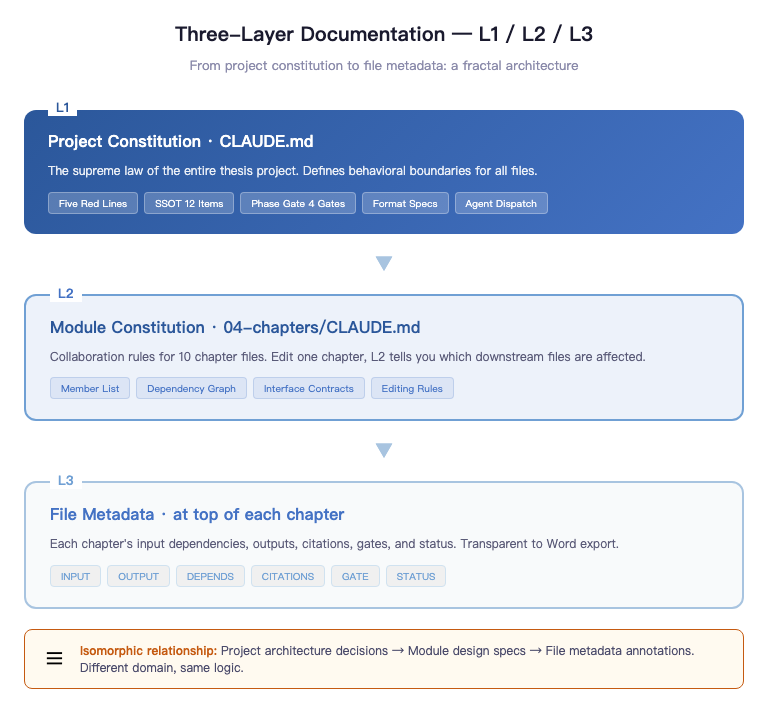
L1 is the project constitution — that CLAUDE.md. Five red lines, 12 SSOT entries, four Phase Gates, formatting spec, agent orchestration rules. This is the supreme law of the entire thesis project. It rarely changes, but it defines the behavioral boundaries of every other file.
L2 is the module constitution — 04-thesis-chapters/CLAUDE.md. It governs the collaboration relationships among these 10 chapter files: member manifest (what each file is, how many words, what status), dependency graph (chapter six depends on chapter four's hypotheses, chapter five depends on chapter nine's Appendix A), interface contracts (how data is shared between chapters, how citations are bidirectionally checked). When you change a chapter, L2 tells you which downstream files this change affects.
L3 is file metadata, embedded in an HTML comment block at the top of each chapter file. Each chapter has its own INPUT (input dependencies), OUTPUT (downstream outputs), DEPENDS (dependent files and data sources), CITATIONS (key references), GATE (chapter-specific quality gates), STATUS (first draft / revising / pending review / finalized). This comment block doesn't affect Word export, but during AI collaboration, it's critical context.
This three-layer structure mirrors the documentation architecture of a mid-sized software project. Project-level architecture decision records, module-level design specs, file-level metadata annotations -- different domain, same logic. A thesis isn't software, but it operates at the same complexity scale. Apply the same engineering methods, get the same results.
But honestly, the most interesting part of this whole system is the assembly script.
1,262 lines of JavaScript. One command, ten seconds, 10 Markdown files become 1 Word file. With auto-generated table of contents, three-line table formatting, odd/even page headers (odd pages show chapter title, even pages show "Peking University Master's Thesis"), footnotes, and pagination system (abstract and TOC in Roman numerals, body in Arabic numerals). 0.97MB, format-compliant, ready to print.
What this script fundamentally does is completely separate content from formatting.
Markdown files handle only content. Chapter titles, body paragraphs, citation formats, table data, image references — everything about "what was written" lives in Markdown. How it's presented — font, line spacing, margins, table styles, headers and footers — lives in the script.
The two are fully decoupled. Advisor says "add a column to that table in chapter four" — you open chapter four's Markdown file, edit the table, save, re-run the script. Ten seconds, new Word file, formatting perfectly consistent, not a single line of layout code touched. Advisor says "change line spacing to 22pt" — you change one parameter in the script, re-run, line spacing updates across all chapters, not a single Markdown file touched.
This is "separation of concerns" applied directly to the thesis context. Not an abstract principle — an engineering decision whose value you feel with every single revision.
Worth spelling out the comparison. The traditional approach? You edit content in Word while simultaneously using style tools to adjust formatting. Two concerns intertwined in one file. Change content, formatting might break. Change formatting, content might shift. You can never be certain you only touched what you intended.
With Markdown + script, the two concerns are physically isolated. Content files have zero formatting code. The script has zero substantive content. When you open a file, you know what you're doing, and you know you'll only affect that one thing.
That's why 10 Markdown files are a hundred times better than 1 Word file — not because Markdown is particularly brilliant, but because it forces you to separate what should be separated. Once separated, every part is easier to modify, easier to verify, easier to track.
You're not the thesis author slash Word typesetter. You're the thesis product manager.
A product manager doesn't write code or do design. A product manager defines how the system works. Where content lives, where formatting lives, how they integrate, who owns quality -- these are product-level decisions.
Get these decisions right, run the pipeline, and the system handles the rest. Content goes to ten Markdown files. Formatting goes to 1,262 lines of script. Quality goes to Phase Gate. Data calibration goes to SSOT. You're not hacking through the thesis jungle on memory and discipline alone -- you're navigating a designed system along a defined route to the finish line.
Advisor Feedback as Tickets — Closing the Review Loop
The day my advisor sent the first round of feedback, I did something most people wouldn't.
I didn't immediately open the thesis to make changes. I opened a new Markdown file, pasted the advisor's seven feedback items verbatim, then added fields to each one: chapters affected, impact scope, revision plan, status, priority. Status has only three values: pending, in progress, completed. Priority has only two levels: P0 is must-fix, P1 is nice-to-fix.
This took me twenty minutes. But those twenty minutes were the most valuable twenty minutes of the entire review cycle.
Advisor feedback isn't a conversation. It's a ticket.
The difference: a conversation ends and it's gone. A ticket has status, tracking, and closed-loop confirmation. Over voice messages, the advisor raises seven points. You roughly remember five, fix three, fix two in the wrong direction, and skip the remaining two thinking they're unimportant. When the advisor sees the next draft, she can't quickly confirm what you actually changed. This isn't anyone's fault -- it's a structural deficiency of conversation. Conversations don't leave traces.
Tickets are different. Seven feedback items in a file. Each has a status. Each has revision records. Each traces to exactly which line of which file changed. The advisor asks "did you fix this?" You don't search your memory. You open the checklist, find the entry in three seconds: completed, revised March 6, 2026, chapter three section 3.2 paragraph four, git commit 73a9e64.
This isn't about impressing the advisor. It's about keeping yourself lucid.
After the first round, I did a retrospective. The advisor's seven items fell into three categories: overstated claims, structural issues, data details. Overstated claims were the most systematic -- the thesis had over a dozen instances of "proves," "confirms," "validates," but this is an exploratory study with a sample size too small for that level of certainty. This wasn't about swapping a few words. It was a full-text tone-down.
So the first revision round did exactly one thing: global tone-down. Find every overstated claim, replace with exploratory language. "Proves" becomes "preliminarily suggests." "Confirms" becomes "initially validates." "Shows" becomes "indicates a trend." This sounds like self-weakening. It's not. A study with 28 test cases and 216 beta sessions shouldn't say "proves." That's not modesty. It's scientific integrity.
The second round tackled structural issues: deleting redundant paragraphs, fixing logical contradictions, supplementing scenario analyses. Harder than tone-down. Deleting redundancy requires judgment -- which paragraph to keep, which to cut. No mechanical merging. Fixing contradictions means finding where two chapters say inconsistent things and deciding which version wins. Supplementing scenarios means writing new content -- not editing, generating.
The third round was residual cleanup. The first two rounds caught problems humans could find. The third round used grep to scan all target terms, checking for any that slipped through. grep -rn "proves\|confirms\|validates" 04-thesis-chapters/ — one command, which file, which line, every instance listed. Humans miss. Machines don't.
Three rounds done. All seven items changed to "completed." But I didn't close the file. I added a note at the bottom: which were structural changes, which were expression changes, what proportion each represented, what types of issues the advisor might raise next time.
This note is only for me. But writing it down turned a single review cycle into reusable knowledge. Next round of feedback arrives, I don't start from scratch. I have the template.
Traditional advisor feedback handling: every round starts from zero. Ticketized: every round iterates on the last.
Over the long run, iteration and restart lead to completely different outcomes.
What Role Does AI Play in This System
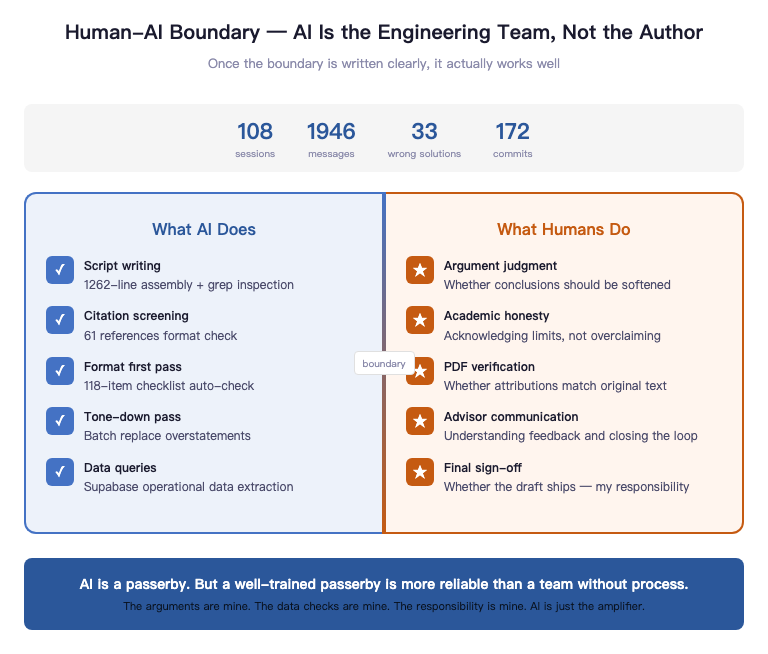
People see "1,262-line JavaScript assembly script," "grep cross-checks," "three-round iterative review" and ask: did AI write all of this?
The honest answer: yes, and no.
Technical execution -- much of it, yes. Authorship -- no.
AI's role in this system isn't the author. It's the engineering team.
It writes the scripts. It runs the cross-checks. It handles initial citation screening and first-pass formatting. Anything deterministic, repetitive, and verifiable gets handed off. Because that kind of work should be automated, not ground out by human brains.
But whether an argument holds, whether a conclusion should be toned down, which gaps shouldn't be filled just to look complete -- that's my call. Sloppy first drafts just need rewriting. Wrong attributions can't be walked back at the defense. This is why, over time, I increasingly had AI verify rather than write.
The thesis project has its own CLAUDE.md. It's not a manual -- it's boundary conditions.
The most important part isn't what AI can do. It's what AI can't. False attribution is banned. Inflating data is banned. Passing test cases off as real users is banned. 216 sessions during beta testing means 216 sessions. Preliminary validation means preliminary validation. AI's biggest problem isn't laziness -- it's eagerness. It will instinctively max out every claim. So boundaries must be hardcoded in advance.
Once boundaries are clearly written, it works beautifully. Within bounds, its execution is powerful. Beyond bounds, it gets stopped cold.
But this system also has a side effect.
When you treat AI as an engineering team, you must accept one thing:
It will make mistakes.
Over a month of usage, the system logged 108 sessions, 1,946 messages, 33 wrong solution attempts, 16 comprehension errors. Some problems I ended up solving myself.
This isn't an AI problem. It's a system design problem.
So I added a rule: all diagnoses must be verified before fixing.
Three steps: list three possible causes, write a minimal test to verify each, then decide how to fix.
AI is great at executing. Not great at judging. The real work isn't "making AI smarter" -- it's making the system safer.
There's another lesson.
When you start using multi-agent parallel workflows, the pace gets very fast. But the faster things move, the more control you need.
Because AI is excellent at quickly executing the wrong thing.
The system must have gates. Not for complexity's sake, but to prevent high-speed crashes.
Over time I noticed something.
Everyone's discussing how to use AI.
But that's not the question that actually moves the needle.
The real question is: how do you design systems for AI to work inside?
Tools matter. But tools are just the entry point.
Structure is the moat.
The human-AI boundary boils down to three lines: AI verifies, humans judge. AI builds frameworks, humans define expression. AI automates, humans own the outcome.
It can find every problem. It can't decide which conclusions should be conservative, which sentences should be toned down, which places need to acknowledge limitations for academic honesty. The assembly script can auto-generate the Word file. But whether that manuscript is ready to submit -- that's my signature, not AI's.
AI is a day laborer. But a well-trained day laborer is more reliable than a full-time team with no process.
It doesn't understand why this thesis exists. It doesn't care whether it passes. It handles the tasks in this one session, then moves on. Precisely because of this, the system must spell out every input: what the red lines are, where the data comes from, what needs to be delivered.
This line can't be blurred. Blur it, and you don't know whose work the final thesis really is. Keep it clear, and you know: the arguments are mine, the data was verified by me, the responsibility is mine. AI is an amplifier. Nothing more.
The Methods Aren't Scarce. The Will to Implement Is.
SSOT, Phase Gate, modularity, assembly script, literature ledger, review closure -- every method in this article is publicly available. None of them are secrets.
But they share one thing in common: every single one was built after a crash.
Between knowing and doing, the gap isn't information. It's scar tissue.
None of these methods are difficult. What's difficult is that before you've crashed, you won't think you need them. What's even harder: even after you know about them, you might not be willing to actually build the full system at this intensity.
Writing a thesis is just one example.
Most knowledge work is the same problem. Writing a book, producing a report, conducting research, building a product -- once the complexity is high enough, it stops being a writing problem.
It becomes systems engineering.
The real competitive advantage in the AI era might not be who writes faster.
It might be who designs better systems.
This is what I've been thinking about most lately: Agentic Engineering.
The thesis hasn't been defended yet. Defense is in May. I don't know the outcome.
But as of today, every piece of advisor feedback has closed-loop tracking. Every data point is traceable to its original source. Every citation can be matched to a specific page in its PDF.
The system is running. It hasn't crashed yet.
If it still crashes in the end, at least it'll crash inside an auditable system.
And not inside a Word file called
thesis-v3-revised-final-FINAL-actually-final-this-time.docx
Treat a thesis as a document, and you'll keep reworking forever.
Treat it as a system delivery, and you'll actually ship it.
If you just wanted to read an article, stop here.
If you want to actually build this system -- that's next time.
I'm Uncle J. I'll let you know whether the system crashed after the defense.